Links & backlinks

Notion makes it easy to link to all kinds of content in and outside of your workspace 🔗
מעבר לשאלות הנפוצותInline in a paragraph
There are a few ways to link another Notion page inside a paragraph:
@-mention: Type
@, then start entering the name of the page you want to link. Find and select it in the menu that appears.[[ command: Type
[[, then start entering the name of the page you want to link. Find and select it in the menu that appears.+ command: Type
+, then start entering the name of the page you want to link. Find and select it in the menu that appears.
As a block
You can insert a link into a Notion page as a block so you can easily place it wherever you want in the page. To do this:
In a page, enter the slash command
/link. Alternatively, you can click the+that appears on hover to the left of any block, and selectLink to pagefrom the dropdown.Start entering the name of the page you want to link. Find and select it in the menu that appears.
To move the block, click
⋮⋮to the left of it and drag it to your desired location in the page.

Note: When you add a Link to page block, the linked page will show up in your sidebar under the page where you inserted the link, just like any other sub-page.
Every block in Notion has its own anchor link that can be copied and shared. These are great for directing someone's attention to a specific part of a long Notion page! To link to a specific block:
Hover over the block and click the
⋮⋮that appears to the left.Select
Copy link to block. This will copy the URL of that specific block to your clipboard.Paste this URL anywhere — in a Notion page, a Slack message, an email, and more.
When you paste a web page’s URL into Notion, it can create a compact, easy-to-read link mention to help your page look nice and clean. You can even hover over the link to see a quick preview. To use a link mention in your page:
Paste the URL.
In the menu that appears, select
Paste as mention.The web page will be displayed with an icon, the source, and the title of the page.
Note:
Link mentions work best with public web pages. Any links that require certain permissions or authentication to view won’t be pasted into Notion with any rich information.
If your browser has cookies blocked, link mentions may not render properly.

When you link to something inside of an app that integrates with Notion, Notion can generate a preview for it! Learn which platforms are supported here →
Backlinks show you all the pages that link to the page you’re currently on. You can use these to navigate your workspace.
Backlinks are created automatically every time you @-mention a page. To see a page’s backlinks, select {#} backlinks under its title, or its properties if it’s a database page.
You will only be able to see backlinks for pages you have access to. Other people won’t see backlinks to your private pages. Backlinks to pages that are only visible to you will be labeled as Private.
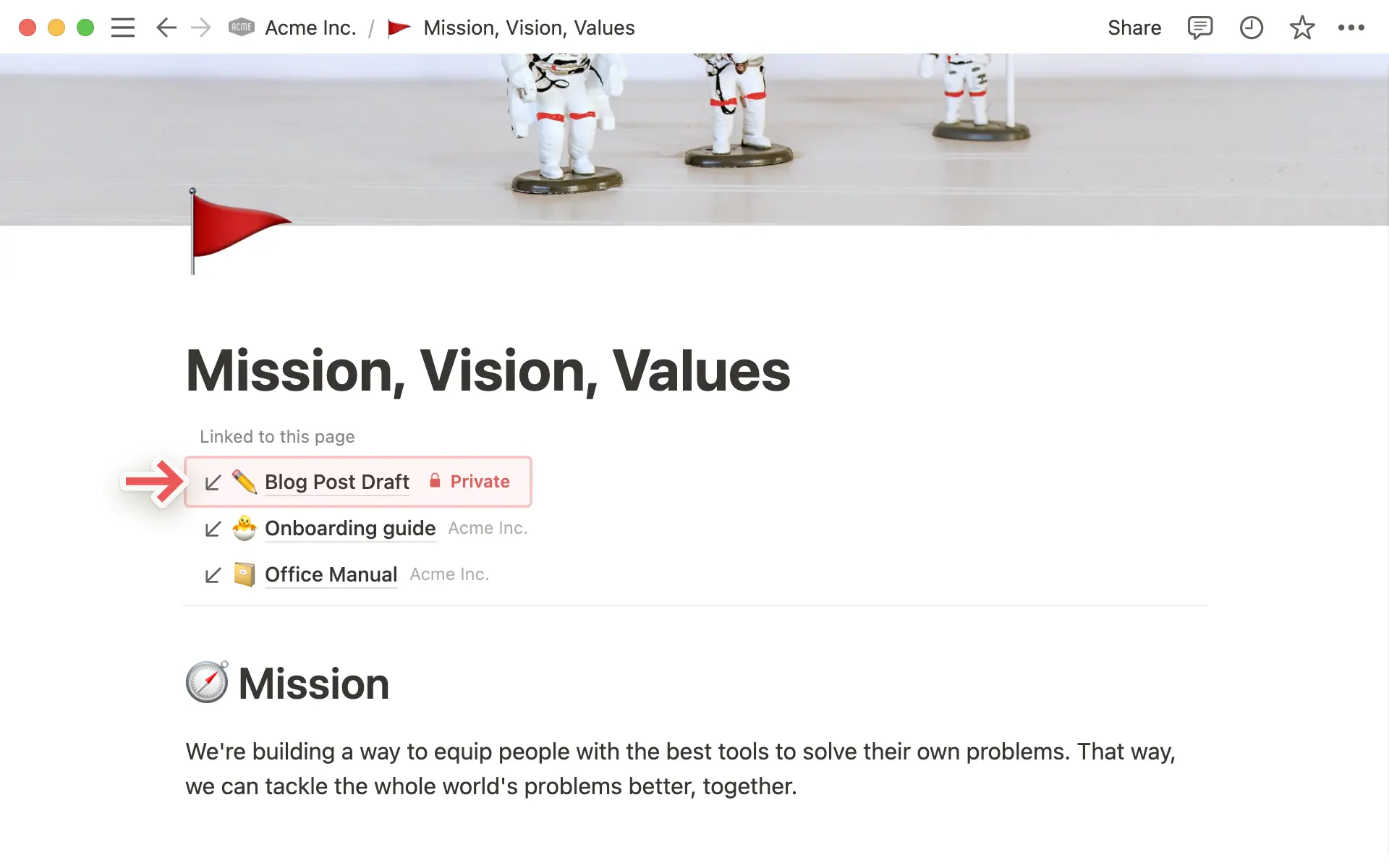
Backlinks automatically appear above the page title and show on hover whenever a page has them. This is automatic. If a page has no backlinks, nothing appears.
Learn more
שאלות נפוצות
איך פותחים באופן אוטומטי קישורים של Notion באפליקציה למחשב?
איך פותחים באופן אוטומטי קישורים של Notion באפליקציה למחשב?
אם אתם רוצים שקישורים לדפי Notion ייפתחו באפליקציה למחשב:
פותחים את Notion בדפדפן האינטרנט.
עוברים אל
הגדרות←העדפות.מפעילים את האפשרות
פתיחת קישורים באפליקציה למחשב.
האפליקציה למחשב צריכה להיות כבר מותקנת. כמו כן, יש להיכנס ל-Notion באפליקציה למחשב ולוודא שהאפשרות פתיחת קישורים של Notion בדפדפן בהגדרות, כבויה.
מה ההבדל בין אזכור עמוד באמצעות @ לבין הוספת בלוק 'קישור לעמוד' (Link to page)?
מה ההבדל בין אזכור עמוד באמצעות @ לבין הוספת בלוק 'קישור לעמוד' (Link to page)?
קישור לעמוד פועל בדומה ליצירת תת-עמוד. כאשר מקשרים לעמוד Notion בדרך זו, הוא יופיע בסרגל הצד כתת-עמוד של העמוד שבו הוא קושר.
אזכור עמוד באמצעות @ יוצר משהו הדומה יותר להיפר-קישור. עמודים שתאזכר באמצעות @ לא יופיעו כתת-עמודים של העמודים שבהם הם אוזכרו.